Introducing the Flodesk Deliverability Center
Table of Contents Jump to:
Jump to:
Table of contents
The Flodesk Deliverability Center is one place in your Flodesk account to see what affects your email deliverability and take action when something needs attention. It brings domain authentication, a compliance checklist, audience health, list cleaning and list warming together in your main navigation, right next to your emails and your audience.
For years, most of what affects deliverability has been invisible. You hit send and hope for the best, and for a small business, every email that lands in spam is a sale, a booking or a relationship that never happened. Flodesk is making a platform-wide commitment to the best deliverability in the industry for small businesses, and the Flodesk Deliverability Center is step one.
What is email deliverability?
Email deliverability is whether your email lands in the inbox, lands in spam or gets rejected before it arrives. It’s different from delivery, which only means your email left Flodesk and didn’t bounce. Picture a mail carrier who drops your envelope at the building. Delivery is the drop-off. Deliverability is whether it reaches the mailbox.
Gmail, Yahoo, Apple and Outlook decide where each email goes based on three things: whether your sending address is authenticated, whether your setup follows their rules and how your subscribers respond to what you send. The Flodesk Deliverability Center covers all three.
How do I check my sending address and domain authentication?
The Flodesk Deliverability Center starts by showing whether you’re set up right. It checks your default sending address, which is the address your subscribers see your emails coming from, and tells you if you’re sending from a free address like Gmail, a custom domain that isn’t authenticated yet or a fully authenticated custom domain. A custom domain is an email address that ends in your business name, and inbox providers can verify it in a way they can’t with a free address.
For a custom domain, the Flodesk Deliverability Center also checks SPF, DKIM and DMARC, the records that prove to inbox providers you are who you say you are. Each one gets its own status badge and a clear next step, so you know what’s working and exactly what to do if something isn’t. You make the fix with your domain host, like GoDaddy or Namecheap, because the Flodesk Deliverability Center can’t change DNS records for you. It’s worth a periodic look even if you authenticated years ago, since settings on your domain host’s side can change.
What does Flodesk already handle for compliance?
Inbox providers like Gmail, Yahoo and Microsoft keep a growing list of rules for senders, and Flodesk handles them for you. The compliance checklist shows which rules are already covered, with no action needed on your end, so you can see the work happening behind the scenes.
How healthy is my email list?
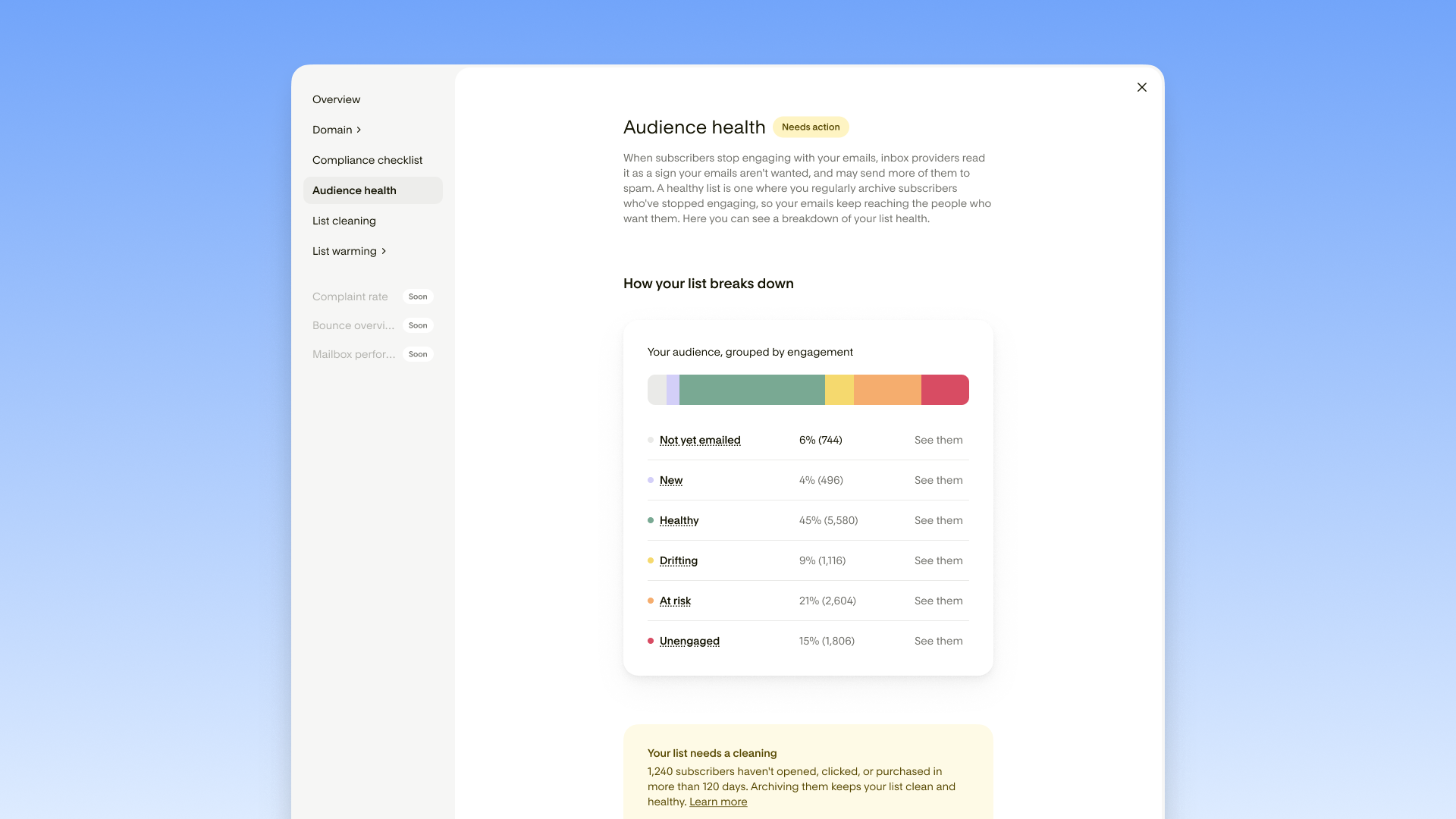
Flodesk audience health shows where your list stands, and it matters because inbox providers watch how people respond to your emails. When a big part of your list never opens, providers read that as a sign your emails aren’t wanted, and they may send more of your mail to spam, including the mail headed to subscribers who do want it. Providers also weigh recent activity more than history, so a subscriber who opened everything three years ago and nothing in the last six months no longer counts as healthy.
The Flodesk Deliverability Center breaks your list down by engagement: healthy, drifting, at risk and unengaged, with a count for each. Click any group to see those subscribers in your audience.
How do I clean my email list in one click?
Flodesk list cleaning archives the subscribers who have stopped engaging, so your emails go to the people who are paying attention. Every email sent to someone who doesn’t open it tells inbox providers your emails aren’t wanted, and that affects where all of your emails land, not just that one.
You choose how deep to go: a light scrub, a standard clean or a deep clean. You see how many subscribers each level would archive, then click Clean now. Archiving never deletes anyone. Archived subscribers stop receiving your emails but stay in your account, and you can unarchive them at any time.
How do I warm up my email list?
To warm up an email list, you start by sending to your most engaged subscribers and build up to your full list in larger batches. Early opens and clicks tell inbox providers your email is wanted, which helps everything you send afterward. Inbox providers don’t like surprises, and emailing your whole list at once after a quiet stretch, a new domain or a move to a new platform is one of the fastest ways to get flagged.
List warming in the Flodesk Deliverability Center walks you through a four-step plan: clean your list, create warming segments, write one engaging email and pick a cadence. Flodesk creates the warming segments for you based on your list size and drops them into your audience, where they work like any other segment. You write and send the emails yourself, so you stay in control.
What’s coming next to the Flodesk Deliverability Center?
This is step one. Next up are complaint rate, which shows when subscribers report your emails as spam or unsubscribe, a bounce overview that explains why your emails are bouncing and mailbox performance, which shows how your emails do with each inbox provider. Each one will appear in the Flodesk Deliverability Center as it’s ready.
Deliverability is ongoing, and Flodesk is staying in it with you.
Ready to see where your list stands?
Check your audience health in the Flodesk Deliverability Center
Frequently asked questions about the Flodesk Deliverability Center
The Flodesk Deliverability Center is one place in Flodesk to see what affects whether your emails reach the inbox. It covers domain authentication, compliance, audience health, list cleaning and list warming, and it lives in your main navigation.
Not for domain records. For SPF, DKIM and DMARC, the Flodesk Deliverability Center shows what’s expected and what it found, and you update the record with your domain host. List cleaning and warming segments are created for you with one click once you choose to run them.
Those checks only appear when a custom domain is your default sending address. The Flodesk Deliverability Center also reflects your default sending address only, so to check another domain, switch your default in Account settings > Email setup.
Flodesk recommends the standard clean, which archives unengaged and at-risk subscribers. The deep clean is stricter and also archives drifting subscribers. The light scrub archives unengaged subscribers only.
No. Flodesk list warming creates your warming segments and helps you plan a schedule, and you write and send the emails yourself.
Not yet. It covers domain authentication, compliance basics and audience engagement, which are among the most common and most fixable causes of deliverability problems. Complaint rate, a bounce overview and mailbox performance are coming